deviant art


Login
Join deviantART for FREE Take the Tour Lost Password?
Deviant Login
Shop
 Join deviantART for FREE Take the Tour
[x]

More from ~starsys

Featured in Groups:

Details

July 10, 2008
1.5 MB
Link
Thumb

Statistics

Comments: 11
Favourites: 43 [who?]
Views: 20,924 (0 today)
Downloads: 7,828 (0 today)

License

Creative Commons License
Some rights reserved. This work is licensed under a
Creative Commons Attribution-Noncommercial-No Derivative Works 3.0 License.
[x]
:iconstarsys:
:iconyouareplz::iconallowedplz:

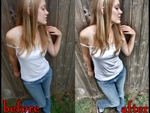
sometimes it doesnt work with image that too much contrast.
you can adjust the lumonisity of the copy layer..for best result just change the layer mode to lighten or overlay mode


if u like me..
credit me in your description by linking back to my deviant
be creative and have fun! :D

my email
starlight2605@gmail.com
:icon:
Add a Comment:
 
love 2 2 joy 1 1 wow 0 0 mad 0 0 sad 0 0 fear 0 0 neutral 0 0
:iconkingteam:
Mood: Adoration ~KINGTEAM Jul 10, 2010  Hobbyist Photographer
Thank u dude :aww:

--
K I N G T E A M D E S I G N

:bulletblue: FaceBook ID: Mohammad F. King [link]
:bulletblue: Add me on iChat: kingt3am@mac.com
:bulletblue: FaceBook page: [link]
Reply
:iconpoooood:
niiiiiiiiiiiiice ! very good stuff !
i add some levels at the end !
nice work man
Reply
:iconstarsys:
thanks for using it..
Reply
:iconsteve-yamagata:
Hi. How does this action works? What do i have to do?

--
A fav says more than 1000 comments

Whitebaeard in:
DA OP Crew: [link]
Numbuh OP Crew: [link]
Guitar Strom Trooper: [link]
Reply
:iconstarsys:
Put the action in action folder in adobe file. then press F9 to see the action.
Reply
:icon:
Add a Comment: